13 minutes
Bringing an Android TV box back to life
Introduction
I’ve had an Android TV Box sitting around for quite some time now, stuck in what appeared to be an endless bootanimation loop. It is a Tanix TX6 with the Allwinner H6 SoC. Since I have more free time now due to Episode 51, I figured why not try to get it booting.
And so began a 24-hour journey of digging into unfamiliar hardware, understanding part of the bootchain, and of course, a few hair-splitting moments along the way.
Chapter 1: A clear cut plan
I started off by downloading the armbian imager and flashing an sdcard with an Ubuntu release for the Tanix TX6. I was informed that these ATV boxes allow booting from an SD-Card if it was inserted before the power is turned on. I wasn’t able to get a USB connection from my PC to the ATV box so the plan was to boot into armbian and dump the eMMC and then format the box somehow.
I plugged in the sdcard and connected the box to power as well as HDMI and ethernet - no output. I did some research and found out that it was a relatively common issue with the u-boot provided by newer armbian images. So I downloaded an older armbian image and flashed the sdcard with balenaEtcher. Plugged it in again and I still had no output.
Researched further and found a guide that made me do some manual modifications on the u-boot. Did everything in there and I still had no luck. A friend told me that there is usually a small pinhole that would boot the device into recovery. I tried that and it booted into barebones Android recovery. It appeared there was something to work with after all.
I thought perhaps wiping cache would resolve the bootloop but alas it did nothing. So I was back at zero again. I had an USB-A to USB-A cable so I tried to get a USB connection once more to see if there was any ray of hope there however, it powered the box instead. Another friend suggested that I should try to use a regular USB-A to USB-C cable and plug the USB-A to the box while the USB-C should be plugged in my PC.
That actually did give me something to work with as I saw this:
Oct 31 19:25:23 erdtree kernel: usb 8-1: New USB device found, idVendor=1f3a, idProduct=efe8, bcdDevice=ff.ff
This was there for half a second while booting which got me to realize that it is the BROM mode being advertised for half a second at early init. It reminded me of working on cancunf where the preloader port was advertised for a few seconds at boot. I installed sunxi-tools and used sunxi-fel to establish a connection via sudo sunxi-fel ver. It kept crashing with:
sunxi-fel: fel.c:191: aw_read_usb_response: Assertion `strcmp(buf, "AWUS") == 0' failed.
I didn’t know how to proceed further so I was looking up on videos of people flashing stuff on the Tanix TX6 which was when I came across a video of someone flashing the stock firmware on the Tanix TX6. I noticed right before he started flashing, he used a pin to press a hidden button on the side of the box. I had an epiphany right then and there that the second hidden button was to force the box to boot into BROM. I clicked on it while connecting to power and I finally got the device to stay in BROM mode as seen below:
Oct 31 03:20:28 erdtree kernel: usb 8-1: New USB device found, idVendor=1f3a, idProduct=efe8, bcdDevice= 2.b3
Chapter 2: The rabbit hole
I started by trying sudo sunxi-fel ver and I got an output:
AWUSBFEX soc=00001823(unknown) 00000001 ver=0001 44 08 scratchpad=00007e00 00000000 00000000
I downloaded the u-boot from a repo and tried to boot into it by running sudo sunxi-fel -v -p uboot u-boot-sunxi-with-spl.bin but it timed out as such:
Warning: no 'soc_sram_info' data for your SoC (id=1823)
usb_bulk_send() ERROR -7: Operation timed out
It also kept timing out with any other command at that point so I unplugged the power and re-plugged while clicking the button to enter BROM mode again.
The unknown part from sunxi-fel ver did cause some skepticism so I looked up on the source of sunxi-tools-upstream and found out that Arch’s package is relatively outdated so I built it from source and this time the ver command had a different output:
AWUSBFEX soc=00001823(H616) 00000001 ver=0001 44 08 scratchpad=00027e00 00000000 00000000
I tried booting into uboot with it and it progressed further but it still timed out at some point:
found DT name in SPL header: sun50i-h6-tanix-tx6
Stack pointers: sp_irq=0x00021400, sp=0x00053FE4
MMU is not enabled by BROM
=> Executing the SPL... done.
usb_bulk_send() ERROR -7: Operation timed out
So I tried to confirm if FEL R/W actually works by trying a simple SRAM upload via printf '\x01\x02\x03\x04' > /tmp/test.bin && sudo sunxi-fel -v write 0x20000 /tmp/test.bin and then a SRAM download by sudo sunxi-fel -v read 0x20000 4 /tmp/test-read.bin and xxd proved that FEL R/W did in fact work:
00000000: 0102 0304 ....
The provided hello-world u-boot in sunxi-tools-upstream did load fine so I was wondering where to go from here. I researched further and came across a commit that seems to be related to my current situation so I took it upon myself to build u-boot. That was a wild experience as I had to add userpatches manually and build it with docker.
It however led me back to the same output as before. I was stumped at this point as I didn’t want to take apart the box. This was when I realized that the ver command’s output was rather suspicious in a way. It said my SoC ID is 0x1823 with H616. That made no sense since the TX6 is supposed to come with H6 so I looked up the Tanix TX variants and I found 3 variants of it: TX6, TX6S with AXP305 PMIC, and TX6S with AXP313 PMIC.
This made me realize that the actual hardware differs from the casing of the box itself thus I went on a spree of trying to figure out which TX6S variant I have. This led me to download a few Tanix TX6 and TX6S firmwares and dump them with sunxi-fw to figure out the exact variant of the box I possess currently. I experimented with the supported Tanix TX6S board configurations available in the u-boot source as well as cross-referencing DRAM and PMIC configuration values with the Tanix TX6S firmware dumps but it kept leading me back to the timeouts.
This led me to one u-boot build that actually managed to load:
found DT name in SPL header: allwinner/sun50i-h616-tanix-tx6s-axp313
Stack pointers: sp_irq=0x00021400, sp=0x00053FE4
MMU is not enabled by BROM
=> Executing the SPL... done.
loading image "ARM Trusted Firmware" (57460 bytes) to 0x40000000
loading image "U-Boot" (727000 bytes) to 0x4a000000
loading DTB "allwinner/sun50i-h616-tanix-tx6s-axp313" (34064 bytes)
The relevant configurations of that first booting build were:
CONFIG_AXP313_POWER=y
CONFIG_AXP_DCDC2_VOLT=1000
CONFIG_AXP_DCDC3_VOLT=1500
CONFIG_DRAM_CLK=648
CONFIG_DRAM_SUNXI_CA_DRI=0x00001c1c
CONFIG_DRAM_SUNXI_TPR0=0xc0001005
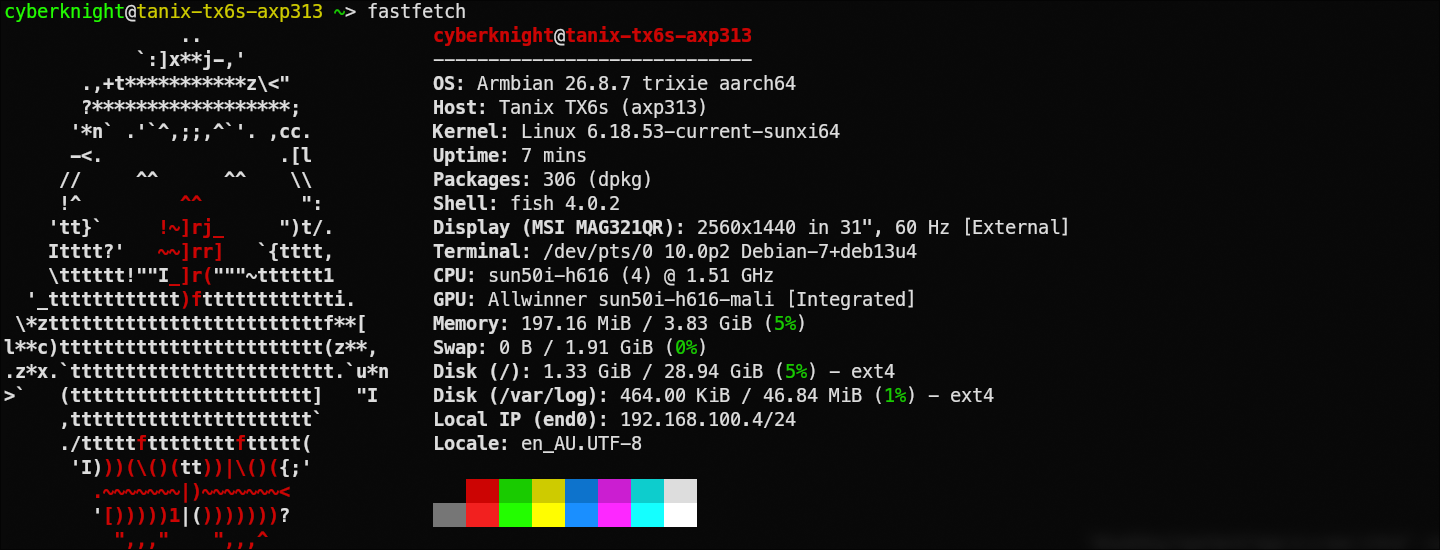
This essentially verified that the actual hardware of the box was a TX6S with the Allwinner H616 SoC that utilized the AXP313 PMIC, not the TX6 with Allwinner H6 SoC as I assumed originally based on the casing of the box. I moved on to try to get USB gadget and UMS working with u-boot that led me to have the eMMC being identified by my PC. From there, instead of continuing further with u-boot, I decided to give armbian one last try with the proper image and this time it actually booted into armbian.
Chapter 3: A glimpse of hope
I ssh’d into the box from my PC and dumped the partition list which showed me some interesting things such as:
NAME          SIZE RO FSTYPE LABEL  PARTLABEL     MOUNTPOINTS
mmcblk2      28.9G  0
├─mmcblk2p1    32M  0 vfat   Volumn bootloader
├─mmcblk2p2    16M  0               env
├─mmcblk2p3    32M  0               boot
├─mmcblk2p4     2G  0               super
├─mmcblk2p5    16M  0               misc
├─mmcblk2p6    32M  0               recovery
├─mmcblk2p7     1G  0 ext4          cache
├─mmcblk2p8    16M  0               vbmeta
├─mmcblk2p9    16M  0               vbmeta_system
├─mmcblk2p10   16M  0               vbmeta_vendor
├─mmcblk2p11   16M  0 ext4          metadata
├─mmcblk2p12   16M  0               private
├─mmcblk2p13  512K  0               frp
├─mmcblk2p14 15.5M  0               empty
├─mmcblk2p15   16M  0               media_data
├─mmcblk2p16   16M  0 vfat          Reserve0
└─mmcblk2p17 25.6G  0 f2fs          UDISK
It was wild seeing a 2GB super and a F2FS-formatted userdata partition coming from working on Android phones. I started off by dumping the boot image and using my go-to boot image modification utility: magiskboot. It led me to find even funnier things such as the fact that SELinux was set to permissive as well as a userdebug build although I did know that it was a userdebug build since before but I couldn’t do anything about it since I had no adb access earlier.
I modified the boot ramdisk to enable adb by default like I did with my android devices by adding an adb_debug.prop file that contained the following props:
ro.debuggable=1
ro.force.debuggable=1
ro.adb.secure=0
I also added an empty force_debuggable file that would force Android to load the adb_debug.prop to enable adb by default. I repacked the boot image and flashed it back on the eMMC then tried to boot Android and I still had no luck with adb. My next course of action was to dump the super partition and enable adb directly from /system/etc/init/init.rc.
This would have been a straightforward path but I wanted to confirm if AVB was on so I dumped the vbmeta images and used avbtool to check. That led me to the following output:
Minimum libavb version:   1.0
Header Block:             256 bytes
Authentication Block:     576 bytes
Auxiliary Block:          3200 bytes
Public key (sha1):        2597c218aae470a130f61162feaae70afd97f011
Algorithm:                SHA256_RSA4096
Rollback Index:           0
Flags:                    0
Rollback Index Location:  0
Release String:           'avbtool 1.1.0'
Descriptors:
    Chain Partition descriptor:
      Partition Name:          vbmeta_system
      Rollback Index Location: 1
      Public key (sha1):       cdbb77177f731920bbe0a0f94f84d9038ae0617d
      Flags:                   0
    Chain Partition descriptor:
      Partition Name:          vbmeta_vendor
      Rollback Index Location: 2
      Public key (sha1):       cdbb77177f731920bbe0a0f94f84d9038ae0617d
      Flags:                   0
    Prop: com.android.build.product.os_version -> '10'
    Prop: com.android.build.product.security_patch -> '2019-12-05'
    Prop: com.android.build.boot.os_version -> '10'
    Hash descriptor:
      Image Size:            19560448 bytes
      Hash Algorithm:        sha256
      Partition Name:        boot
      Salt:                  11a6f08ba53e87d49d3ad1d569a9807ec850d40a8c9c8e286fc2cc31d8e1d793
      Digest:                0c0efa87084ef650822de68ba0ab7cd63703a67711e8c2e61887e61f7725d1db
      Flags:                 0
    Hash descriptor:
      Image Size:            25923584 bytes
      Hash Algorithm:        sha256
      Partition Name:        recovery
      Salt:                  9fa3a6449f5bbf2334fd692259c7244298bd3ef20b235fc023e0afdf14126e09
      Digest:                9102b4958b8262730368fe736ddeca806a8b907bb90f06e9b0afe48af7f11f38
      Flags:                 0
    Hashtree descriptor:
      Version of dm-verity:  1
      Image Size:            105164800 bytes
      Tree Offset:           105164800
      Tree Size:             835584 bytes
      Data Block Size:       4096 bytes
      Hash Block Size:       4096 bytes
      FEC num roots:         2
      FEC offset:            106000384
      FEC size:              843776 bytes
      Hash Algorithm:        sha1
      Partition Name:        product
      Salt:                  f83cbf40c9edffa314c95db95d68156650c384d7
      Root Digest:           5f572bd26be0716f14f2b8897bfd767bd1968e7b
      Flags:                 0
This practically cockblocked my supposedly straightforward plan as AVB verification was on. I was stumped once more but then I decided to dump the userdata partition and check if it was perchance encrypted. To my surprise, it was not encrypted at all. I backed up the userdata partition and was going to format data in Android recovery and then restore the apps back again.
Before I booted into Android’s recovery, I had a thought. I’ve caused and fixed a bazillion bootloops over the years working on Android phones. I never backed down then and am sure as hell not going to now so I started looking for ways to enable adb and fix the bootloop. I poked into the init configurations and found some interesting things. persist.vendor.usb0device=1 is needed to be set for the USB port to stop routing to host EHCI. Additionally, adbd is only auto-started if persist.sys.usb.config is set. So I set additional props based on the vendor props in the boot ramdisk’s adb_debug.prop such as:
persist.sys.usb.config=adb
persist.vendor.usb0device=1
persist.adb.tcp.port=5555
persist.service.adb.enable=1
sys.usb.config=adb
service.adb.tcp.port=5555
This was also when I noticed that there was an empty debug_ramdisk directory in the boot ramdisk so I copied the adb_debug.prop into it. Then I poked into the DTB to check the port type set and it was set to host mode as usb_port_type = <0x01>;. I patched the DTB at offset 0xb690 (usb_port_type) from 0x01 to 0x00 which would make the USB port initialize as peripheral mode. After packaging the boot image, I went on to properly set the persist props by modifying the /data/property/persistent_properties file in the userdata partition. For those that are unaware, prior to Android 9, every persist.* property was stored as a separate file on disk as like /data/property/persist.foo.prop. However, since Android 9 and above, it was stored as a single binary file that is serialized using Google’s Protocol Buffers (protobuf). I deserialized it using the protoc command as such:
$ protoc --decode=PersistentProperties \
           ~/yaap/system/core/init/persistent_properties.proto \
           < /mnt/data/property/persistent_properties > props.txt
Thankfully I still had yaap synced locally so I had the schema for persistent_properties available locally. Moving on, I modified the props.txt to add the following props:
persist.sys.usb.config=adb
persist.vendor.usb0device=1
persist.adb.tcp.port=5555
persist.service.adb.enable=1
Then, I serialized it with protoc --encode=PersistentProperties ~/yaap/system/core/init/persistent_properties.proto < props.txt > /mnt/data/property/persistent_properties.new. I took a backup of the original persistent_properties just in case and replaced the original with my modified file with relevant permissions and ownership.
I rebooted into Android and at long last, there was progress with ADB. I still wasn’t able to use ADB since it was unauthorized but I could detect the device nonetheless. My next step was to boot back into armbian and push my device’s public adb key into /data/misc/adb/adb_keys and /data/adb/adb_keys with relevant permissions and ownership.
Finally at long last, I had working adb and thus came the time for me to start debugging the actual bootloop.
cyberknight@erdtree ~> adb devices
List of devices attached
5c00142894428711d8e	device

cyberknight@erdtree ~> adb shell
p281:/ $
Chapter 4: The final sprint
I executed adb logcat and viewed the logs thoroughly which led me to some snippets that pointed out the root cause of the bootloop.
02-19 19:13:40.030  2171  2195 E installd: Failed to free up 1048576000 on /data; final free space 118923264: Success
02-19 19:13:40.035  2382  3183 W DeviceStorageMonitorService: java.io.IOException: Failed to free 1048576000 on storage device at /data
02-19 19:13:40.035  2382  3183 W DeviceStorageMonitorService: 	at com.android.server.pm.PackageManagerService.freeStorage(PackageManagerService.java:4905)
02-19 19:13:40.035  2382  3183 W DeviceStorageMonitorService: 	at com.android.server.storage.DeviceStorageMonitorService.check(DeviceStorageMonitorService.java:193)
02-19 19:13:40.035  2382  3183 W DeviceStorageMonitorService: 	at com.android.server.storage.DeviceStorageMonitorService.access$100(DeviceStorageMonitorService.java:72)
02-19 19:13:40.035  2382  3183 W DeviceStorageMonitorService: 	at com.android.server.storage.DeviceStorageMonitorService$1.handleMessage(DeviceStorageMonitorService.java:257)
02-19 19:13:40.035  2382  3183 W DeviceStorageMonitorService: 	at android.os.Handler.dispatchMessage(Handler.java:107)
02-19 19:13:40.035  2382  3183 W DeviceStorageMonitorService: 	at android.os.Looper.loop(Looper.java:214)
02-19 19:13:40.035  2382  3183 W DeviceStorageMonitorService: 	at android.os.HandlerThread.run(HandlerThread.java:67)
--------- beginning of crash
02-19 19:13:40.063  2382  3183 E AndroidRuntime: *** FATAL EXCEPTION IN SYSTEM PROCESS: DeviceStorageMonitorService
02-19 19:13:40.063  2382  3183 E AndroidRuntime: java.lang.NullPointerException: Attempt to invoke virtual method 'void com.android.server.wm.WindowManagerInternal.addWindowToken(android.os.IBinder, int, int)' on a null object reference
02-19 19:13:40.063  2382  3183 E AndroidRuntime: 	at com.android.server.notification.NotificationManagerService$10.enqueueToast(NotificationManagerService.java:2309)
02-19 19:13:40.063  2382  3183 E AndroidRuntime: 	at android.widget.Toast.show(Toast.java:143)
02-19 19:13:40.063  2382  3183 E AndroidRuntime: 	at com.android.server.notification.NotificationManagerService.lambda$doChannelWarningToast$2$NotificationManagerService(NotificationManagerService.java:4944)
02-19 19:13:40.063  2382  3183 E AndroidRuntime: 	at com.android.server.notification.-$$Lambda$NotificationManagerService$8Pjq1sh4PByau66KrVt7XTs1eXA.runOrThrow(Unknown Source:4)
02-19 19:13:40.063  2382  3183 E AndroidRuntime: 	at android.os.Binder.withCleanCallingIdentity(Binder.java:357)
02-19 19:13:40.063  2382  3183 E AndroidRuntime: 	at com.android.server.notification.NotificationManagerService.doChannelWarningToast(NotificationManagerService.java:4937)
02-19 19:13:40.063  2382  3183 E AndroidRuntime: 	at com.android.server.notification.NotificationManagerService.enqueueNotificationInternal(NotificationManagerService.java:4711)
02-19 19:13:40.063  2382  3183 E AndroidRuntime: 	at com.android.server.notification.NotificationManagerService$10.enqueueNotificationWithTag(NotificationManagerService.java:2376)
02-19 19:13:40.063  2382  3183 E AndroidRuntime: 	at android.app.NotificationManager.notifyAsUser(NotificationManager.java:494)
02-19 19:13:40.063  2382  3183 E AndroidRuntime: 	at com.android.server.storage.DeviceStorageMonitorService.updateNotifications(DeviceStorageMonitorService.java:499)
02-19 19:13:40.063  2382  3183 E AndroidRuntime: 	at com.android.server.storage.DeviceStorageMonitorService.check(DeviceStorageMonitorService.java:232)
02-19 19:13:40.063  2382  3183 E AndroidRuntime: 	at com.android.server.storage.DeviceStorageMonitorService.access$100(DeviceStorageMonitorService.java:72)
02-19 19:13:40.063  2382  3183 E AndroidRuntime: 	at com.android.server.storage.DeviceStorageMonitorService$1.handleMessage(DeviceStorageMonitorService.java:257)
02-19 19:13:40.063  2382  3183 E AndroidRuntime: 	at android.os.Handler.dispatchMessage(Handler.java:107)
02-19 19:13:40.063  2382  3183 E AndroidRuntime: 	at android.os.Looper.loop(Looper.java:214)
02-19 19:13:40.063  2382  3183 E AndroidRuntime: 	at android.os.HandlerThread.run(HandlerThread.java:67)
This proved that due to the userdata partition being at 100% capacity with only about 115MB free out of 26GB, DeviceStorageMonitorService detected this and attempted to display an emergency low-storage warning Toast. Howeover since this ran before WindowManagerService had published WindowManagerInternal, that led to NotificationManagerService throwing a fatal NPE which subsequently cascaded into killing system_server and causing Zygote to restart it indefinitely in a boot loop.
I fixed this by deleting some redundant files to free up about 9GB and then restarted Zygote with setprop ctl.restart zygote and voila, it finally booted into Android.
Reflection
Honestly this was a really crazy ride from trying to boot armbian to messing around with BROM mode to building my own u-boot with my own modifications to booting with ADB on and finally fixing the bootloop. I learned a lot while working on this ATV box for the past 24 hours but the primary lesson is that Allwinner boxes genuinely suck and trying to figure this out without opening the box is truly a painful decision to be made.
I hope you had fun reading this :)
2710 Words
2026-11-01 02:24